nyan.nvim: a statusline that became a minimap
It started as a joke. I wanted Nyan Cat in my Neovim statusline — the iconic pop-tart feline trailing a rainbow as I scrolled through code. The kind of thing you build on a Sunday and never tell anyone about.
It didn't stay a joke. Somewhere along the way it turned into the most useful thing on my statusline.
The accidental good idea
The original mechanic was simple: the rainbow trail grows as you scroll deeper into a file, so the trail length doubles as a scroll indicator. Cute. But it got me thinking — if the statusline already knows where I am in the buffer, what else could it show me at that same proportional position?
That question produced the space theme, which is now the default renderer. Instead of a cat, you get a compact minimap of the current buffer:
[ · │ · ✕ · ▷ · · · ✕ · · │ · · · · · ]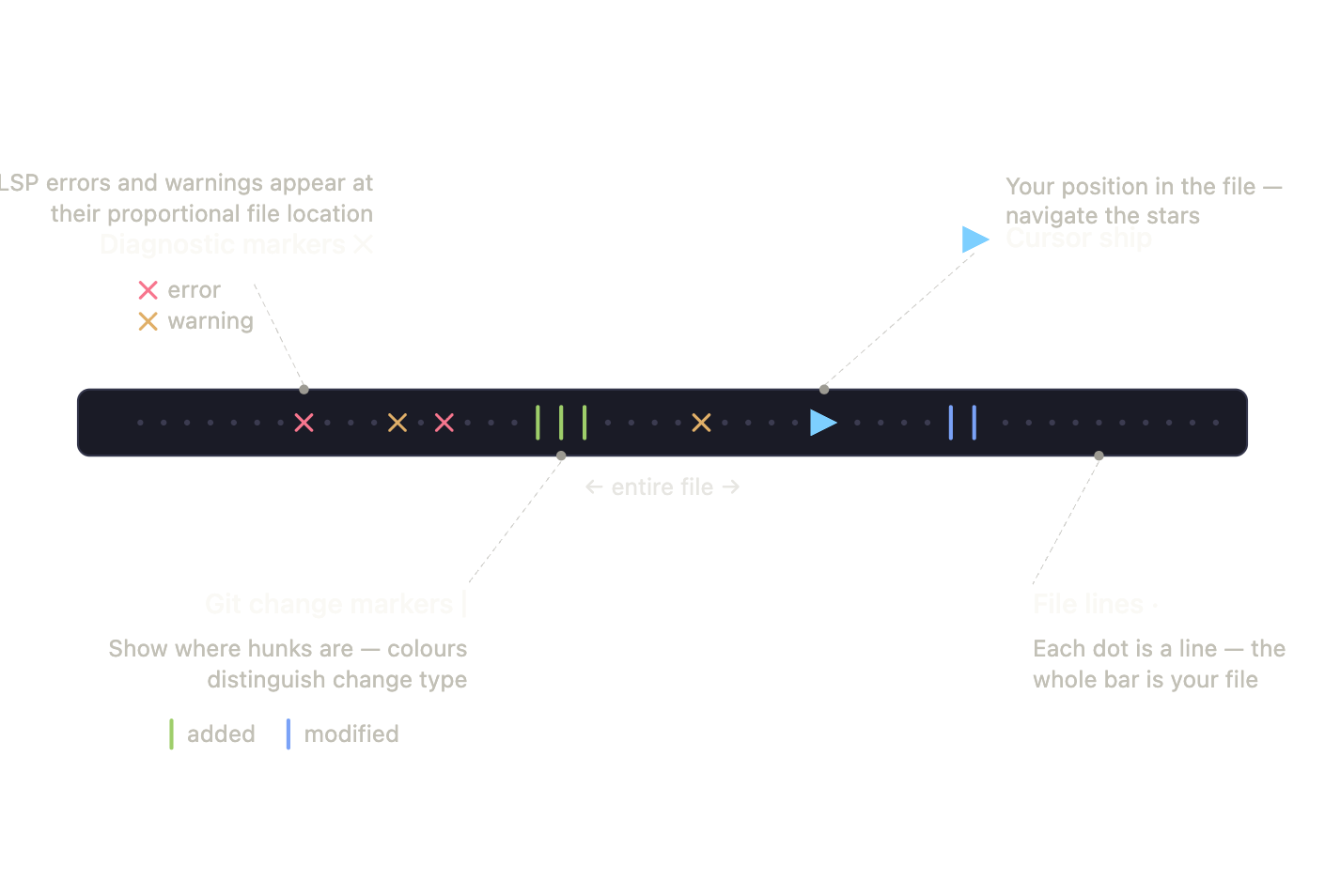
The ship ▷ is your cursor position. The ✕ markers are LSP
diagnostics, placed at their proportional location in the file. The │
markers show where git hunks live. Colour encodes severity and change
type. In a single line you get a spatial overview of your file's
health — where the errors are, where you've made changes — without
leaving your code or opening a sidebar.
It's the kind of ambient information I didn't know I wanted until it was there.
How it works
The diagnostic markers come straight from Neovim's built-in
vim.diagnostic API, mapped from line numbers to proportional positions
across the component's width. The git markers integrate with gitsigns
when it's available — instant, in-memory, no shelling out — and fall
back to parsing git diff directly when it isn't, so the plugin works
with zero extra dependencies.
The whole thing links to your existing colourscheme's highlight groups
by default. NyanDiagError links to DiagnosticError, the git markers
link to the GitSigns* groups, and so on. It inherits your theme rather
than fighting it.
The cat is still there
For when you want it, classic mode renders the actual animated Nyan Cat using the Kitty Graphics Protocol — real pixel art in the terminal, not ASCII approximation. This was the most interesting technical piece to build. Terminals that speak the protocol (Kitty, Ghostty, and a growing list of others) can render and animate inline images, and driving that from a statusline component meant managing frame timing and placement inside a space that was never designed for graphics.
For terminals that don't support it, there's a colourful ASCII fallback, so nobody's left with a broken statusline.
What I took from it
A few things stuck with me after building this:
The best features often start as something you build for fun. I'd never have designed a "diagnostic minimap statusline component" from a blank page — it emerged from messing about with a scroll indicator. Play is a legitimate design process.
Graceful degradation matters even for toys. The gitsigns-or-git-diff fallback and the graphics-or-ASCII fallback mean the plugin works for everyone, which is the difference between something people can actually install and something that only works on my machine.
And sometimes the silly name is worth keeping. nyan.nvim could have been "statusline-minimap.nvim" and nobody would remember it. The cat is the reason you clicked.
Source is on GitHub, MIT licensed.